How to Build a Professional Cleaning Checklist Planner for KDP Using Editable Interiors
Creating a high-quality low-content book for Amazon KDP requires more than just a good idea—it demands a well-structured interior that balances functionality with print-ready precision. The Cleaning Checklist Planner KDP Interior offers a complete packaging of editable and print-optimized files designed to streamline the entire publishing process. Whether you are a first-time KDP publisher or a seasoned creator looking to expand your planner catalog, understanding how each component in this download works will save you hours of formatting frustration and ensure your final product meets Amazon’s strict upload standards.
The Core Components of a KDP-Ready Planner Package
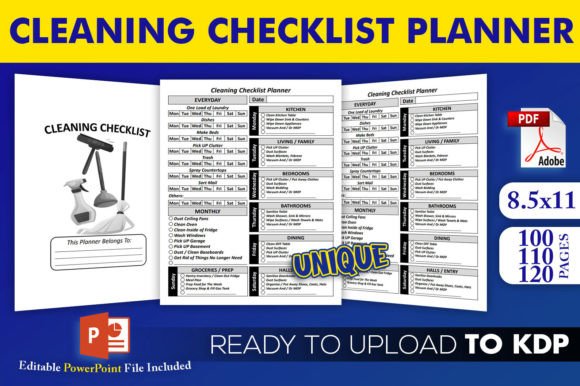
When you open a professional planner interior package, you typically receive a set of files that serve distinct roles in the production pipeline. The Cleaning Checklist Planner KDP Interior includes an editable PowerPoint source file and three PDF interiors at different page counts—100, 110, and 120 pages. Each file has been tested directly on KDP, meaning the margins, trim size, and bleed settings are already configured to pass Amazon’s validation checks. This eliminates the trial-and-error phase that often derails new publishers.
The PowerPoint source file (PPTX) is the engine room of the entire package. It allows you to adjust cleaning categories, add or remove checklist rows, tweak font styles, and insert your own branding elements before exporting the final PDF. The three pre-made PDFs, on the other hand, are ready for immediate upload. This dual approach gives you both a shortcut to publication and a customization toolkit for creating multiple variations of the same planner.
Understanding the No-Bleed Advantage at 8.5×11 Inches
All files in this set are formatted with a trim size of 8.5×11 inches and no bleed. For Amazon KDP, “no bleed” means your content stays within the safe zone, avoiding the 0.125-inch extra margin required for full-bleed printing. This simplifies the upload process because you do not need to extend background elements beyond the page edge. The no-bleed format is ideal for planner interiors where clean white borders around each page create a crisp, professional look that matches standard letter-size notebooks and binders.
Because the trim size is a common US letter dimension, the planner fits naturally into standard three-ring binders, spiral coils, or wire-o binding. Users who purchase the printed book can also remove pages and insert them into a binder for daily use, which is a practical advantage for busy households or professional cleaners who need to customize their workflow on the fly.
Workflow for Customizing the Editable PowerPoint Source
The PowerPoint file is where you will invest most of your creative energy. Open the PPTX in PowerPoint or a compatible presentation tool. You will find each page built as a slide, with text boxes, checkboxes, and table structures already laid out. The cleaning checklist planner interior typically includes a cover page, a use-instructions page, and multiple checklist grids organized by room or task category.
Start by reviewing the existing content to understand the logical flow: daily cleaning tasks, weekly deep-clean items, monthly maintenance reminders, and seasonal checklists. You can rename these categories to match your target audience. For example, a version aimed at Airbnb hosts might emphasize turnover cleaning between guests, while a home version might focus on family routines. Because the text is fully editable, you can localize terminology or add specialized sections like “green cleaning supplies” or “pet-friendly sanitization steps.”
Adjusting Page Count and Layout Consistency
The three included PDF interiors (100, 110, and 120 pages) give you a ready-made range of sizes. If you want to offer a thinner “starter” planner and a thicker “comprehensive” version on separate KDP listings, you have both options already formatted. To create a custom page count not included in the package, duplicate or delete slides in the PowerPoint file. Each slide corresponds to one printed page, so adding five extra checklist pages is as simple as copying a slide and updating its content. When you reach your desired count, export the entire file as a PDF using the “Print” or “High Quality” setting to preserve resolution.
A key observation here is that PowerPoint handles table grids reliably for KDP interiors, provided you keep the font size between 10 and 12 points for readability and set line weights to 1 point or higher. Thin lines below 0.5 points may appear faint in print, especially on cream paper. If you intend to publish a paperback edition, consider testing a single proof copy before listing live.
Why High-Resolution Interiors Matter for Printed Planners
The phrase “high-resolution interiors” refers to the crispness of text, lines, and any embedded graphics at 300 dots per inch (DPI) or higher. When users purchase a cleaning checklist planner, they expect to write in it with pen or pencil without encountering fuzzy lines or pixelated checkboxes. Low-resolution interiors look unprofessional and can lead to negative reviews, which hurt your listing’s ranking.
This particular download provides graphics and layout elements at a resolution suitable for offset-quality digital printing. Even if you plan to expand the planner with additional icons or decorative headers, ensure any images you insert are at least 300 DPI at the final print size. Scaling a small image up to 8.5×11 inches will result in visible blurring. Use vector-based elements when possible, or source high-resolution stock assets specifically labeled for print use.
Practical Use Cases for Different Publisher Goals
Publishers approach the Cleaning Checklist Planner KDP Interior from different angles, and understanding these use cases helps you position your final product effectively. A home organization blogger might use the editable file to create a branded planner that complements their website content, uploading it to KDP as a low-cost lead magnet or paid product. A professional cleaning service owner could customize the interior with their company logo and sell it as a client gift or upsell item on their service page. Educational creators might adapt the checklists for life skills classes, teaching students how to manage household tasks systematically.
Each of these scenarios benefits from the three PDF variants because you can test different price points. A 100-page planner at $6.99 can serve as an entry-level offering, while the 120-page version at $9.99 provides more perceived value without requiring additional design work. The no-bleed format also keeps manufacturing costs lower, which improves your royalty margin per sale.
KDP Upload Validation and Common Pitfalls
One of the strongest selling points of this interior package is that the files have been tested on KDP. This means the PDFs pass Amazon’s automated manuscript check for page count consistency, margin compliance, and font embedding. However, you still need to upload the correct file for the binding type you choose. For a paperback, use the standard PDF. For a spiral-bound or coil-bound version, you may need to adjust the file if your print-on-demand service requires different margins.
If you edit the PowerPoint source and then export a new PDF, double-check that all fonts are embedded. KDP requires embedded fonts to render the text correctly on any device. In PowerPoint, go to File > Options > Save and ensure “Embed fonts in the file” is checked. For extra safety, convert any unusual fonts to outlines or use standard fonts like Arial, Calibri, or Times New Roman that are universally available.
Another common issue is file size. The interior package PDFs are designed to be under the 650 MB limit that KDP imposes for paperbacks, but if you add many high-resolution images, the export may exceed that threshold. Reduce image sizes by compressing them to 300 DPI and using JPEG format for photographs rather than PNG.
Leveraging Multiple Page Counts for Series Development
Having three page counts in one download encourages series thinking. You can publish the 100-page version as “The Essential Cleaning Checklist Planner,” the 110-page version as “The Complete Home Cleaning Log,” and the 120-page version as “The Ultimate Deep Cleaning Binder.” Each title targets slightly different search intents. Some customers search for a quick, no-nonsense checklist, while others want a comprehensive system that includes weekly and monthly logs. By using the same base design, you create a consistent brand across your KDP catalog while meeting varied user expectations.
When you list multiple planners, ensure each description clearly states the page count difference. Buyers appreciate knowing exactly how many sheets they will receive. You can also rotate which version is the primary listing and use the others as backlist titles. Because all three interiors share the same trim size and style, your customers may purchase multiple versions if they want one for home and another for their vacation property.
Observations from Real-World Planner Usage
I have seen publishers take this interior and pivot it into niche markets that the original template did not anticipate. One creator replaced the word “cleaning” with “maintenance” and targeted RV owners who need seasonal checklists for their vehicles. Another added a column for “supplies needed” and marketed the planner to professional office cleaners who manage multiple client sites. The editable PowerPoint file made these adaptations possible without redesigning from scratch.
A practical detail worth noting is that users of the printed planner often write with gel pens, highlighters, and pencils. Dark gray or light blue grid lines are generally preferred over solid black because they guide handwriting without overpowering the text. If you adjust the table styles in the PowerPoint file, consider using a subtle border color such as a 40% gray. This small change can improve the user experience and reduce visual fatigue during daily use.
For publishers who sell on both Amazon KDP and their own storefront, the no-bleed PDFs can be printed at local copy centers without reformatting. The 8.5×11 inch size is the standard for laser printers, so customers who buy the digital file directly from you can print at home with accurate margins. This dual-channel flexibility increases the value of the interior package beyond the KDP platform alone.
Evaluating the Balance Between Structure and Flexibility
The Cleaning Checklist Planner KDP Interior provides a structured system with predefined checklists, but it also leaves room for your personalization. Each of the three PDFs contains a consistent header and checklist layout, allowing you to offer a polished product quickly. At the same time, the PowerPoint source gives you complete control over content. This balance is rare in pre-made interiors: many templates lock you into a fixed design, while others offer too few page options to create a complete book.
If you are new to KDP, start by uploading one of the three PDFs exactly as they are. List the book, order a proof copy, and review the print quality. Once you see how the structure works in physical form, you can return to the PowerPoint file and make targeted improvements for your next version. This iterative approach minimizes risk and builds your confidence with the platform.
For experienced publishers, the value lies in speed. You can take the editable file, swap out color accents, update the title page, and have a new listing live within two hours. The three page counts also allow A/B testing: run the same keywords against two different page counts to see which conversion rate performs best, then double down on the winning format.
Final Thoughts on Maximizing the Interior Package
Because the files have been tested on KDP and include both editable and ready-to-upload formats, the Cleaning Checklist Planner KDP Interior removes the most time-consuming parts of self-publishing: formatting, margin calibration, and page count consistency. Your job shifts from technical troubleshooting to content strategy and marketing. Focus on identifying the specific cleaning audience you want to serve—busy parents, professional organizers, first-time homeowners—and tailor the checklist categories in the PowerPoint file to their needs.
The three PDFs at 100, 110, and 120 pages give you immediate products for different price points, while the no-bleed 8.5×11 trim size keeps printing costs predictable. High-resolution interiors ensure every checkbox and heading prints cleanly, which directly affects customer reviews and repeat purchases. By combining these elements, you position yourself to launch a cleaning planner that looks custom-made, even though you started from a tested template.