Daily Routine Planner Printable Template for Print and Publishing
A daily routine planner printable template is more than a simple layout for scheduling hours. It serves as a structural foundation you can adapt for personal use, client projects, or commercial book creation. The version described here comes in three distinct sizes, offers Illustrator, EPS, and PDF formats, and includes bleed margins for printing or uploading to platforms like Amazon KDP. Whether you are an experienced designer or someone publishing their first planner, the same template can serve very different purposes depending on your goals, technical comfort, and end use.
What a Daily Routine Planner Printable Template Actually Provides
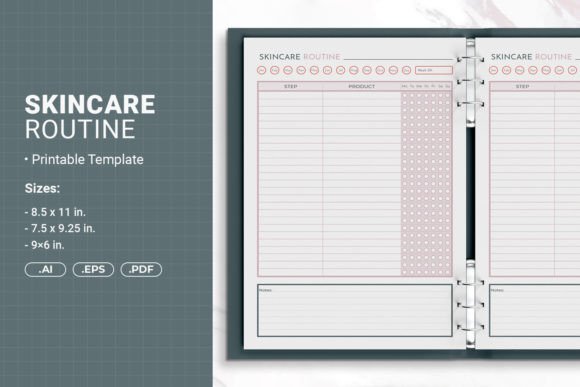
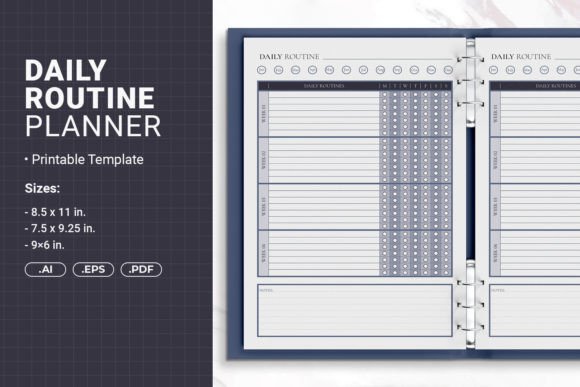
At its core, this template gives you a pre-built framework for organizing daily tasks. It includes space for time slots, to-do items, notes, and recurring habits. The open-source AI files allow full customization, meaning you can shift column widths, change label names, adjust spacing, or apply your own color palette. The EPS and PDF files offer ready-to-use alternatives if you prefer not to work in Illustrator. The package includes three sizes: 8.5 x 11 inches, 7.5 x 9.25 inches, and 6 x 9 inches. Each size behaves differently depending on whether you plan to print at home, use a commercial printer, or publish a paperback through KDP.
The inclusion of bleed margins is a practical detail for self-publishing. Bleed ensures that printed elements extend to the edge of the page after trimming. Without it, white borders can appear along the edges. For anyone uploading to KDP, this feature saves the hassle of manually adding bleed later. Similarly, the safe margin for hole punching means the template works in binders without losing content to punched holes.
Why the Same Template Matters Differently to Different People
A beginner who wants a simple daily layout may care most about the PDF version. They can open it, print directly, and start writing. An experienced creator or small business owner might focus on the AI file because it allows rebranding, reselling, or adapting the layout for multiple products. An educator or blogger might use the 6 x 9 size for a compact student planner, while a freelancer who manages client projects may prefer the 8.5 x 11 version for detailed time blocking.
The audience is not uniform. Some readers want a finished product they can use immediately. Others want a starting point they can reshape into something saleable. This template accommodates both approaches without forcing either group into extra work.
Beginners and first-time publishers
If you have never created a planner before, the main concern is whether the template will look professional without design skills. The PDF with bleed can be uploaded directly to KDP. You do not need to learn Illustrator or understand margins. You can add your own cover, fill in sample content if required, and publish. The three sizes let you test which format feels right for your audience. A wellness coach might choose 6 x 9 for a pocket-sized habit tracker. A productivity blogger might go with 8.5 x 11 for a comprehensive daily system.
For beginners, ease of use and reliability matter most. The template removes the guesswork around dimensions, bleed, and binding margins. You can focus on content rather than formatting.
Experienced creators and entrepreneurs
If you already sell planners or journals, the AI file gives you flexibility. You can change fonts, adjust grid spacing, add sections for meal planning or exercise logging, and create a branded product line. The EPS file works in other vector software if you do not use Adobe. The three sizes allow you to offer the same planner in multiple formats without rebuilding from scratch. This saves time and ensures consistency across your product catalog.
Commercial value is a priority here. You can use the template as a base for multiple niche planners: one for students, one for remote workers, one for parents. The safe margin for hole punching also makes it suitable for printable bundles sold on Etsy or Gumroad, where buyers expect to insert pages into binders.
Freelancers and service providers
Life coaches, project managers, and consultants sometimes provide daily planners to clients as part of a coaching package or onboarding kit. The 7.5 x 9.25 size is a middle ground: larger than a pocket book but more compact than letter size. It fits in standard binders and feels substantial without being bulky. You can customize the template with your branding and distribute it digitally or in print. The open-source format means you can modify it for each client segment without starting over.
Educators and trainers
Teachers who run time management workshops or study skills programs can use the template as a handout. The 6 x 9 size prints economically, and the PDF version requires no design work. You can also adapt the AI file to include class periods, homework slots, or reading goals. The flexibility allows you to teach the structure of daily planning while giving students a tool they can actually use.
Hobbyists and personal users
Not everyone wants to publish or sell. Some people simply want a clean, printable planner for their own daily use. The template eliminates the need to draw grids by hand or search for a layout that matches their preferred format. If you like the 8.5 x 11 size for your desk or the 6 x 9 size for your bag, you can print only the pages you need. The safe margin means you can punch holes and add them to an existing binder alongside other notes.
How the Three Sizes Shape Your Final Product
Each size serves a different purpose, and understanding these differences helps you choose the right version for your project.
8.5 x 11 inches (215.9 x 279.4 mm)
This is the standard letter size. It offers the most space for detailed entries, multiple time blocks, and extensive notes. It is ideal for desk use, classroom settings, or any scenario where ample writing area matters. For KDP, this size works well for paperback planners that users keep on a table or stand. The larger format tends to feel more substantial and allows for bigger fonts if readability is a concern.
7.5 x 9.25 inches (190.5 x 234.95 mm)
This size is less common but highly functional. It fits neatly in most bags while still offering generous writing space. It is a strong choice for a daily planner that people carry between home and office. The proportions work well for binding, and the paper size feels balanced between portability and usability. If you are creating a product that competes with standard half-letter or A5 planners, this format stands out without being awkward.
6 x 9 inches (152.4 x 228.6 mm)
This is a compact size popular for journals, pocket planners, and affordable paperbacks. It is easy to carry, costs less to print, and feels approachable. The daily layout will have smaller cells, so it works best for concise entries rather than lengthy notes. This size is particularly effective for habit trackers, gratitude journals, or any daily routine planner that emphasizes quick check-ins. It also fits well into a series of related books if you plan to expand your product line.
Customization and Long-Term Usefulness
The open-source AI files mean you are not locked into one design. You can change colors to match your brand, alter the number of time slots, add weekly overviews, or remove elements that do not serve your audience. The EPS file provides a backup format for non-Adobe users. The PDF files work for anyone who wants a no-fuss printable.
Long-term usefulness depends on how easily you can update the template for new projects. Because the files are structured with layers and organized elements, making seasonal adjustments or creating themed versions takes minutes rather than hours. This efficiency matters if you plan to release multiple planners per year.
Identifying Whether This Template Matches Your Goals
Ask yourself a few questions before committing to any template:
- Do you need a ready-to-print PDF for personal use or a customizable source file for commercial projects?
- Which size aligns with your audience’s habits—desk users prefer larger formats, while on-the-go users need compact versions?
- Will you publish through KDP, sell printables on a marketplace, or print at home? Each path benefits from specific features like bleed or hole-punch margins.
- How much design control do you want? The AI file gives full control; the PDF offers convenience.
A beginner publishing their first daily planner may find the PDF with bleed sufficient. An entrepreneur building a brand may need the AI file to create a consistent look across multiple products. A freelancer providing client resources may value the balanced 7.5 x 9.25 size and the ability to rebrand quickly.
The template does not require you to be a designer, but it rewards those who want to learn. If you are comfortable opening Illustrator and exploring layers, you can produce highly customized results. If you prefer a simpler path, the PDF files let you print and publish immediately.
Practical Examples Across Reader Types
- A blogger selling a printable productivity pack: Uses the AI file to adjust the layout, adds a weekly overview page, and exports PDFs for 8.5 x 11 and 6 x 9 to offer two purchase options.
- A freelance productivity coach: Customizes the 7.5 x 9.25 version with the client’s name, prints a few copies for a workshop, and later uploads a generic version to KDP.
- A parent planning homeschool schedules: Prints the 8.5 x 11 PDF directly, adds subjects in the time slots, and punches holes for a binder that grows through the year.
- A small business owner launching a stationery brand: Uses the EPS file to create a consistent layout across a series of planners, tests the 6 x 9 size as an entry-level product, and scales to larger sizes later.
Making the Template Work for Your Specific Project
The practical value of this template comes from its adaptability. You can start with any size and format and evolve your use over time. A first-time user might print the PDF for personal organization. After a few months, they may decide to customize the AI file and offer it as a freebie for their audience. Another user might begin with the 6 x 9 KDP version, gather reviews, and then expand into larger sizes based on customer feedback.
The safe margin for hole punching is a small detail that matters more than most people expect. If you sell printables, buyers often want to insert pages into their existing binders. If the content disappears into the punched holes, they leave negative reviews. This template accounts for that from the start.
Similarly, the bleed margins save time during KDP upload. Many first-time publishers struggle with formatting errors that cause rejected files. Having bleed built into the PDF eliminates one common hurdle.
Reliability and presentation across formats
Whether you use the AI, EPS, or PDF version, the layout remains consistent. Fonts, spacing, and proportions translate cleanly between formats. This reliability matters if you design in Illustrator but need to share EPS files with a printing partner who uses different software. The template holds up across workflows.
Presentation also depends on paper choice and printing quality, but the template itself provides a clean, minimal foundation. You can make it look modern, classic, playful, or professional by adjusting the visual elements in the AI file. The structure stays solid regardless of the aesthetic direction you take.
For anyone evaluating whether this Daily Routine Planner Printable Template matches their skill level or project goals, the key is to consider your end use. If you want a finished, printable product with minimal effort, the PDF serves you well. If you want a customizable base for ongoing creative or commercial work, the AI and EPS files offer lasting value. The three sizes let you choose the physical format that fits your audience’s habits and your production budget. This combination of flexibility and ready-to-use output makes the template suitable for a wide range of users without compromising depth or quality.