How to Choose a Daily Journal Planner KDP Interior Without Regretting It Later
If you are exploring the idea of publishing a daily journal on Amazon KDP, you have likely come across the term Daily Journal Planner KDP Interior. It sounds straightforward enough—a ready-made interior file for a journal or planner that you can upload to Kindle Direct Publishing. But if you are new to this space, or even if you have been around for a while, there are a few things that are easy to overlook. And overlooking them can cost you time, money, and a product that simply does not sell.
Let’s walk through what actually matters when you pick a Daily Journal Planner KDP Interior, especially one that comes with a Canva template you can edit. I want to help you avoid the common missteps that trip up beginners and experienced publishers alike.
What a Daily Journal Planner KDP Interior Really Is
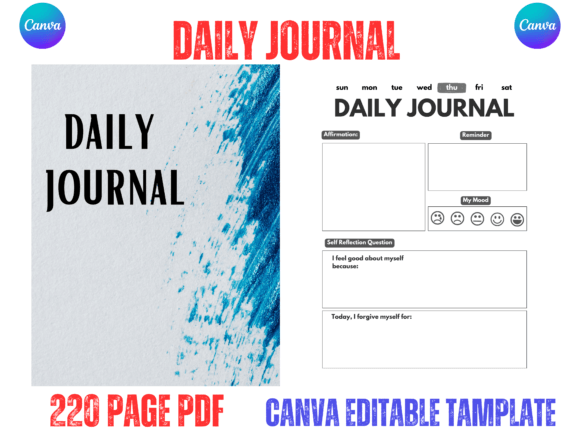
A Daily Journal Planner KDP Interior is essentially the content pages of a journal or planner that you upload as a print-ready PDF to Amazon KDP. It usually includes layout pages for daily entries, weekly overviews, habit trackers, and sometimes additional sections like goal setting or reflection prompts. When you purchase a KDP interior, you are buying the file that goes inside the cover of your book.
Many designers now offer these interiors as editable Canva templates. That means you can open the design in a free Canva account, make changes, and export your own PDF. This is a huge advantage because it gives you control over fonts, colors, and layout without needing expensive software like Adobe InDesign or Affinity Publisher.
The one thing you need to be careful about is that you are not just buying any file. You are buying a file that must meet Amazon’s formatting requirements, look clean on paper, and actually function as a daily journal for your customers. That last part is where most people get it wrong.
Mistake Number One: Choosing Style Over Usability
It is easy to fall in love with a beautifully designed interior. The floral borders, the elegant script fonts, the soft pastel colors—they all look stunning on screen. But when someone prints that journal at home or through Amazon’s print-on-demand service, the experience can be very different.
I have seen interiors where the journaling prompts are printed in a light gray that is nearly impossible to read once the ink hits the page. I have seen handwriting lines that are too narrow for anyone with average-sized handwriting. And I have seen decorative elements that distract from the actual purpose of the journal, which is to write.
What to do instead: Test the usability before you commit. If you have a Canva link, open the template and put yourself in the customer’s shoes. Is the writing space generous enough? Are the prompts clear and readable? Can you customize the line spacing if you need to? A beautiful but unusable journal will get returned or reviewed poorly.
Practical check: Print one page at home
Even if you only print a single page on your home printer, you will immediately see whether the font size works, whether the lines guide the hand naturally, and whether the ink contrast is comfortable to read. This five-minute test can save you from uploading a file that looks great digitally but fails on paper.
Mistake Number Two: Assuming the Canva Template Is Ready to Upload
This is a subtle but important one. Many sellers offer a Daily Journal Planner KDP Interior Canva Template with the promise that you can edit it easily using a free Canva account. That part is usually true. What is not always true is that the template is already formatted for Amazon KDP.
There are dimensions to check. Bleed margins. Trim lines. Page counts that must fall within Amazon’s printing constraints. Some templates come with the correct settings, but others require you to adjust them yourself. If you upload a file with incorrect margins or missing bleed, Amazon may reject your book or print it incorrectly.
What to do instead: Before you make any edits, go to your Canva home page and make sure you make a copy in your own account of the document. Work on that copy, not the original link. Then, verify the dimensions. A standard KDP interior is 8.5 by 11 inches, with bleed set to 0.125 inches if your design goes to the edge. Check that the page count is appropriate for your chosen trim size. For a 220-page journal, you are in a good spot, but confirm that your interior matches that number before you export.
Check the quality of the PDF export
Canva allows you to export as PDF Print, which is the setting you should use. Regular PDF may compress images or lower resolution, and that can lead to blurry text or uneven lines when printed through KDP. Always export using the print-friendly option.
Mistake Number Three: Overlooking the Importance of Content Structure
A daily journal may have the same layout repeated over many pages, but that does not mean the structure is arbitrary. A well-designed interior makes it easy for the user to jump in without reading instructions. The date field should be immediately obvious. The writing prompts should be self-explanatory. The habit tracker, if included, should flow naturally from one day to the next.
I have seen interiors where the date field is tucked into a corner in a tiny font. I have seen planners where the days of the week are not labeled. And I have seen journals where the page numbers reset randomly, making it hard for the user to keep track of their entries.
What to do instead: Look for an interior that prioritizes clarity. If you are editing the Canva template, take the time to reposition elements that feel off. Move the date to a prominent spot. Make sure the font for the day and month is large enough to read at a glance. Consider adding page numbers if they are missing. Small adjustments like these make your product feel thoughtful and professional.
Why the 220-Page Count Matters
You will notice that many Daily Journal Planner KDP Interiors come in a 220-page format. This is not an arbitrary number. Amazon KDP has minimum and maximum page count requirements for different trim sizes, and 220 pages falls comfortably within the range for a 8.5 by 11 inch paperback. It also gives you enough room to include a full year of daily pages, plus a few introductory or supplementary sections, without exceeding cost limits that would eat into your royalty.
But 220 pages also means you need to think about the spine width, the paper quality, and how the journal feels in hand. A thick journal needs a sturdy binding, and Amazon’s print-on-demand handles this well, but you still want to make sure your interior design does not feel cramped just to fit into that page count.
What to do instead: If you are customizing the template, use the available pages wisely. Do not waste pages on unnecessary filler. Every page should serve a purpose for the journal user. If you have 220 pages, plan how many days you want to cover, how many pages each day gets, and whether you want to add extra features like a monthly overview or a goal-setting section at the start.
Mistake Number Four: Ignoring the Competition on Amazon
The KDP marketplace is crowded. Thousands of daily journals are listed, and many of them use similar interiors. If you upload a product that looks exactly like ten others, you will struggle to get noticed. This is where the editable Canva template becomes your biggest advantage.
You do not need to redesign everything from scratch. But you should make small, meaningful changes that differentiate your journal. Change the color palette to something that matches your brand or the mood you want to convey. Adjust the font choices to be more readable or more distinctive. Add a unique prompt or two that reflects your personal style or the needs of your target audience.
What to do instead: Spend an hour customizing the template before you upload it. Swap out the cover color. Change the interior headings. Add a personal note on the first page. These small touches signal to buyers that your product is not a generic copy-paste job. They also reduce the risk of your book being flagged for duplicate content, which can happen if Amazon detects that your interior is identical to another listing.
What to Check Before You Hit Publish
Before you upload your file to Amazon KDP, go through this short checklist:
- Have you made a copy of the Canva template in your own account and worked on that copy, not the original?
- Is the file exported as PDF Print with CMYK color mode if applicable?
- Are the bleed and trim settings correct for an 8.5 by 11 inch book?
- Does the page count match what you entered in KDP (220 pages in this case)?
- Have you tested a printed page at home for readability and contrast?
- Are all fonts embedded or standard so they render correctly on any device?
- Is there a blank page at the end if your total page count is odd?
Running through this list takes ten minutes and prevents most common rejection issues.
Final Thoughts on Getting It Right
The best Daily Journal Planner KDP Interior is one that balances beauty with function. It looks clean on screen, prints well on paper, and makes the act of journaling feel natural and enjoyable for the user. When you choose a template that you can edit in Canva, you have the power to fine-tune every detail. Use that power wisely.
Take the time to test your file before you publish. Customize it enough that it feels like your own product. And remember that a successful KDP journal is not just about the interior design—it is about how well that interior serves the person who will write in it every day.
If you are unsure about any step, start with a free Canva account and explore the template. Go to your Canva home, make a copy in your own account, and experiment. You can always tweak and improve before you upload. That is the beauty of the editable format: you are never stuck with a design that does not work.
Take your time, check the details, and create a journal that you would be happy to use yourself. That is the standard that will help your product stand out and sell well on Amazon KDP.