The Mood Tracker Journal KDP Interior: A Practical Guide to Getting It Right
Creating a mood tracker journal and publishing it on Amazon KDP seems straightforward at first glance. You pick a design, upload it, and hope for sales. But the difference between a product that sells steadily and one that lingers unnoticed often comes down to details most first-time creators overlook. The Mood Tracker Journal KDP Interior is more than a set of files—it is the foundation of your entire listing. Getting that foundation right matters more than most people realize.
Whether you are a seasoned KDP publisher or someone exploring low-content books for the first time, the choices you make about your interior design directly affect customer satisfaction, reviews, and long-term sales. Let's walk through the common pitfalls, misunderstandings, and practical steps that separate a polished product from one that disappoints.
Treating the Interior as an Afterthought
Many new publishers spend hours perfecting their cover design but treat the interior as a quick download. This is a mistake. A mood tracker journal lives or dies by its usability. Readers buy these journals to build a habit, track their emotional patterns, or improve self-awareness. If the interior feels cramped, the layout confuses them, or the pages don't print correctly, they will leave a negative review and never return.
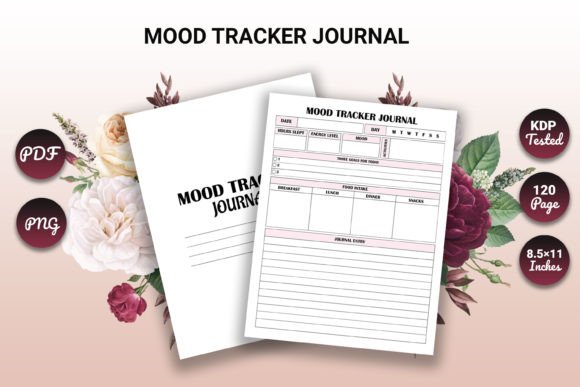
The Mood Tracker Journal KDP Interior comes fully formatted and tested for KDP. That means the trim size, margins, and page count are already optimized for print. When you choose a pre-tested interior like this, you remove the risk of misaligned content or rejected uploads. But even with a quality interior, you still need to verify a few things before hitting publish.
What to check:
- Confirm the trim size matches your cover dimensions exactly. An 8.5 x 11 inch interior needs an 8.5 x 11 inch cover—no exceptions.
- Open the PDF and scroll through all 120 pages. Look for any blank pages, misaligned text, or formatting glitches.
- Test a print sample if possible. Seeing the physical product reveals issues a screen never shows.
Avoid the assumption that "tested for KDP" means zero preparation on your end. It means the file meets KDP's technical requirements. Your job is to ensure it fits your specific book vision.
Overlooking the Difference Between File Formats
The Mood Tracker Journal KDP Interior includes PDF, PNG, and EPS files. Each format serves a different purpose, and confusing them leads to frustration.
The PDF is your primary file for upload. It is print-ready, includes all 120 pages, and adheres to the 8.5 x 11 inch trim size with no bleed. This is what you send to KDP. The PNG files are useful for previews, marketing images, or social media posts. The EPS file gives you editable vector artwork if you want to customize elements like colors or add your own branding.
Common mistake: Trying to upload a PNG or EPS directly to KDP. KDP requires a PDF for the interior. Using the wrong format will delay your book's approval or cause a rejection.
Better approach: Keep each format organized in separate folders. Use the PDF for upload, the PNGs for your listing images and ads, and the EPS only if you plan to edit the design in vector software like Adobe Illustrator. If you are not comfortable with vector editing, stick with the pre-made files. They are designed to work as-is.
Ignoring Page Count Perception
At 120 pages, this interior hits a sweet spot for mood tracker journals. It is substantial enough to feel like a complete product but not so thick that it intimidates a beginner. However, some publishers worry that 120 pages is not enough. They consider adding blank pages or filler to bulk up the count.
Do not do this. Filler pages frustrate customers. They flip past blank sheets wondering why they paid for empty space. A mood tracker journal should feel intentional every page. This interior includes an intro page that welcomes the user and sets the tone. That alone adds value far more than a dozen blank pages ever could.
If you feel strongly about a longer book, consider creating a separate product with a different page count. But for most use cases, 120 pages of well-designed tracking space is exactly what buyers want. Trust the formatting that has already been tested.
Underestimating the Importance of the Intro Page
The intro page titled "Thank you for visiting our portfolio" is included in this interior. Some creators see it as optional or think about removing it. Keep it. That small touch establishes credibility and shows the buyer they are purchasing from a real designer who cares about presentation.
Why it matters: Many low-content books lack any personal touch. An intro page sets yours apart. It signals professionalism and reduces the chance of a customer feeling like they bought a generic, mass-produced file.
If you want to customize the intro page, use the EPS file to edit the text. Change the wording to fit your brand voice while keeping the gratitude and welcome tone. A simple "Thank you for choosing this journal. We hope it supports your journey toward greater self-awareness" goes a long way.
Neglecting the Listing Description
Even the best interior will not sell itself if your product description fails to connect with buyers. The Mood Tracker Journal KDP Interior is a tool for emotional awareness, habit building, and personal reflection. Your description should reflect that.
Mistake to avoid: Writing a description that only lists technical specs—"120 pages, 8.5x11, PDF included." Buyers need to visualize how this journal fits into their life. Describe the experience, not just the file.
Better approach: Paint a picture. Explain how a mood tracker helps someone notice patterns over time, how the simple act of daily check-ins builds self-awareness, and how this particular design makes that process easy and even enjoyable. Mention the included formats as a bonus, not the main selling point.
Example description angle: "Start each day by noting your mood. Over weeks and months, you will spot trends you never noticed before. This undated 120-page journal gives you the space to reflect without pressure. The clean layout works for beginners and experienced trackers alike."
Assuming One Size Fits All Buyers
The target audience for this interior includes adults aged 20 to 50—beginners, professionals, entrepreneurs, educators, freelancers, and hobbyists. That is a wide range. Each subgroup has different expectations.
A busy entrepreneur might want a minimal, no-fuss layout they can complete in under a minute. A creative hobbyist might enjoy a more decorative design with room for color coding or stickers. A therapist or educator using the journal with clients needs clear, readable pages without distracting elements.
This interior strikes a balance. It is clean and professional but still visually engaging. However, your marketing should speak to specific segments. Create separate ads or listing variations if you want to target different buyer personas. A generic "great for everyone" message often resonates with no one.
Forgetting About File Organization and Backup
When you download the Mood Tracker Journal KDP Interior, you receive PDF, PNG, and EPS files. It is easy to save them all in one folder and forget about organization until you need to update your listing. Then you waste time hunting for the correct file.
Practical tip: Create a dedicated folder for each book project. Inside, subfolders for "Print Files," "Marketing Images," and "Editable Source." Store the PDF in Print Files, the PNGs in Marketing Images, and the EPS in Editable Source. Name each file clearly, including the trim size and page count. For example: "MoodTracker_8.5x11_120pages_NoBleed.pdf."
This habit saves you hours over time. It also prevents the costly mistake of uploading an old version or the wrong format when you decide to update your listing later.
Skipping the Final KDP Preview
You have tested the file. You have organized your folders. You have written a compelling description. Now comes the step many people rush: the KDP preview.
KDP provides an online preview tool that simulates how your book will look after printing. Use it. Scroll through every page. Check that margins are even, text is not cut off, and the intro page appears correctly. Look at how the file handles page turns. If anything looks off, go back to your source file and fix it before submitting.
This is your last chance to catch problems. Once the book is live, any formatting issues become permanent until you upload a new version and wait for approval. A few extra minutes in the preview tool can save you months of negative reviews.
Practical Steps Before You Publish
Let's summarize the concrete actions that will set you up for success with this interior:
- Download all three formats and store them in organized folders.
- Open the PDF and verify all 120 pages are present and properly formatted.
- Confirm your cover matches the 8.5 x 11 inch trim size with no bleed.
- Use the PDF for KDP upload—never the PNG or EPS.
- Write a product description focused on the buyer's experience, not just the specs.
- Preview the entire book inside KDP before publishing.
- Order a proof copy if you want absolute certainty.
The Mood Tracker Journal KDP Interior gives you a strong head start. It is high-resolution, tested for KDP, and ready for print. But your attention to the details around the file—organization, description, preview, and target audience—determines whether your product thrives or gets lost in the crowd.
Treat the interior as the core asset it is. Respect the work that went into designing and formatting it, and then build the rest of your listing with the same care. Your customers will notice the difference, and your sales will reflect it.