Laser File Log Book
From tracking delicate laser-cut designs to logging parameters for industrial engraving, a laser file log book serves as the backbone of any organized laser workspace. Whether you operate a small home-based laser engraving business, manage a large fabrication shop, or simply enjoy laser cutting as a hobby, keeping a structured record of your files, settings, and outcomes transforms chaos into clarity. This article explores the essential role of a laser file log book, the qualities that make one effective, and how a carefully designed digital product—such as the one described here—can streamline your workflow and help you produce consistent, high-quality results.
What Is a Laser File Log Book?
A laser file log book is a dedicated record-keeping tool used to document every aspect of a laser cutting or engraving project. It goes beyond a simple notebook; it captures critical details such as file names, material types, power settings, speed, frequency, focal distance, and final notes on results. For professionals who rely on repeatable outcomes, this log becomes an invaluable reference. Without it, you might spend hours re-testing settings for a material you already optimized months ago.
In modern laser workflows, the file itself is only half the story. The parameters you apply—how fast the head moves, how much power the tube delivers, whether you use air assist—can make or break a project. A laser file log book bridges the gap between the digital design (the .ai, .svg, or .dxf file) and the physical result. By systematically recording each run, you build a personalized knowledge base that grows with every job. This is especially important for businesses that need to reproduce orders with identical precision, or for hobbyists who want to avoid wasting expensive materials.
Why a Laser File Log Book Matters in Modern Workflows
Today’s laser enthusiasts and professionals often juggle multiple projects simultaneously. They might work with a CO2 laser one day and a fiber laser the next, switching between acrylic, wood, leather, metal, and more. Each material behaves differently, and even small variations in humidity or temperature can affect results. A laser file log book helps you isolate variables and troubleshoot issues faster.
Consider a scenario: you have a popular custom sign design that you engrave on maple plywood. Your first batch came out perfect. Two months later, a client reorders, but the wood supplier changed slightly. The new batch burns more easily. By referring to your log book, you can quickly see that you previously used 85% power at 300mm/s with a 0.1mm interval. You can then adjust—lowering power to 80%—and log the new settings. Without the log, you would have to guess or re-optimize from scratch.
Moreover, a log book is essential for process validation in commercial settings. If you ever need to prove that a certain output can be replicated consistently, having a detailed record of laser parameters, file revisions, and inspection notes provides solid documentation. This can be critical for ISO certification, customer audits, or quality control reports.
Key Qualities of an Effective Laser File Log Book
Not all log books are equal. The best ones combine structure with flexibility, allowing you to capture the data that matters most to your workflow. Here are the qualities that distinguish a truly useful laser file log book:
- Clear and organized layout: Fields for date, project name, file name, material type, thickness, power, speed, frequency, passes, and notes. A table or grid format makes scanning past entries quick.
- Space for visual references: Thumbnails, test swatches, or before-and-after photos help link the data to the actual result.
- Digital or printable? A hybrid approach often works best—an editable digital template for easy typing, plus a printable version for quick notes at the machine.
- Durability: If you print it, the paper should withstand a workshop environment—occasional spills, dust, and handling.
- Scalability: You should be able to add pages as your project library grows. Pre-designed interior options like 100 or 120 pages give you a comfortable starting point.
An editable source file—such as a PowerPoint PPTX—elevates the log book from a static notebook to a customizable tool. You can add your own headers, change column widths, or insert your company logo. This adaptability is especially valuable for team environments where multiple people contribute to the log. Everyone can work from the same template, ensuring consistency across entries.
How a Digital Laser File Log Book Fits Your Workflow
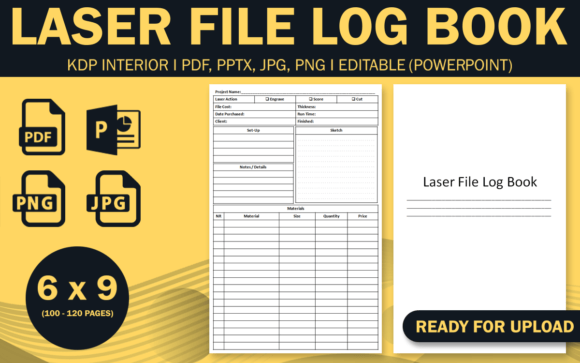
Let’s talk about the specific product mentioned: a complete laser file log book package that includes an editable PowerPoint PPTX, two PDF interiors (100 and 120 pages), JPG and PNG images, all at a 6×9 inch trim size with no bleed. The interiors are high-resolution and tested on KDP, which means they’re ready for print-on-demand publishing. But how does this translate into everyday use?
First, the editable source file is a game changer. You can open the PPTX on your computer, fill in project details directly, and then print only the pages you need. No more handwriting every entry (though some prefer that). You can also reformat sections—for instance, if you want to add a field for “material lot number” or “laser tube hours,” you can simply insert a new row.
Second, the two PDF interiors give you choice. If you’re a prolific creator with many projects per week, the 120-page version offers more entries before you need a new book. If you’re just starting out or prefer a smaller, portable log, the 100-page version is lighter. Both are print-ready with no bleed, so you don’t have to fuss with margins—just upload to KDP or send to a local printer.
The inclusion of JPG and PNG files might seem like a bonus, but they serve a real purpose. You can embed a cover image into your log book design or use the JPG as a quick preview. Some users even print the Log Book title page on sticker paper to label physical binders. The high-resolution ensures crisp text and clean lines, even if you enlarge sections for wall charts.
Practical Benefits of Using a Structured Log
Adopting a laser file log book brings immediate, tangible benefits to your daily work. Here are a few that regular users report:
- Reduced material waste: By recording successful settings, you avoid duplicating tests. Every failed cut becomes a learning data point, not a loss.
- Faster project turnaround: When a repeat order comes in, you don’t have to re-dial settings. Look up the log, load the file, and start the job.
- Improved consistency: Multiple operators can produce identical results by following the same logged parameters. This is critical for brands that value uniformity.
- Better troubleshooting: If a cut quality drops, you can check the log for recent changes—maybe you replaced the laser tube or started using a different assist gas pressure.
- Professional presentation: A clean, printed log book impresses clients who visit your shop. It signals that you run an organized, data-driven operation.
One user I know runs a small Etsy shop selling engraved cutting boards. She logs every order with the wood species, font style, power/speed, and whether she used a rotary attachment. Over a year, she built a reference that lets her start a new order in under five minutes. She also uses the PDF interiors from a log book like the one described here, prints them, and keeps a binder next to her laser. For her, the 100-page version is perfect because she fills about two pages a day.
Considerations When Choosing a Laser File Log Book
Before you download or design a log book, think about your specific needs. The 6×9 inch trim size is a popular choice because it’s large enough to hold detailed notes yet compact enough to fit beside a laser controller. No bleed means the content stays within margins, which is ideal if you plan to print at home or use a commercial printer that doesn’t support full-bleed documents.
Consider the binding. If you use the provided PDF interiors and upload to KDP, you can choose paperback binding. That works well for a log book that stays on a shelf. But if you anticipate adding pages, a spiral or ring-bound format might be better—you can easily insert new pages. Some users prefer to print the JPG or PPTX pages and use a 3-ring binder. The flexibility of having the editable source file allows you to adapt to any binding method.
Also, think about how many entries you need per page. A typical laser file log book might have one or two projects per page, with ample space for notes. The interiors in this product are designed with clear fields and generous lines, so you won’t feel cramped. High-resolution ensures that even small text remains legible, which is important when you’re jotting down numbers like “1100mm/s” or “3.2mm depth.”
Recommendations for Getting the Most Out of Your Log Book
Once you have your laser file log book ready, here are a few practices that will amplify its value:
- Log every run, even failed ones. A failed cut with settings 90% power, 200mm/s gives you a lower bound. Next time you know to reduce power or speed.
- Use consistent naming conventions for files. In your log, reference the file name exactly as it appears on your computer. This prevents confusion when you search for the digital source later.
- Add photos. If your log book allows space (or you attach sticky notes), a smartphone photo of the result next to the entry is priceless. The JPG files in the product could be used to create a visual reference sheet.
- Review periodically. Once a month, skim your log. You might notice patterns—for example, that a certain material always requires 10% more power in winter. Adjust your workflows accordingly.
- Back up digital versions. If you use the editable PPTX, save a copy in cloud storage. You can then access your log from any device, and if you print a new copy, it won’t start blank.
For teams, have each operator initial their entries and note the laser machine used. If you have multiple lasers with different tube ages, the log will help you calibrate per machine. The editable source file makes it easy to add a column for “machine ID.”
Final Thoughts
A laser file log book is far more than a simple notebook—it’s a productivity tool, a quality control instrument, and a personal knowledge database all in one. The right design, with editable formats, multiple page counts, and high-resolution output, can adapt to your exact workflow. Whether you prefer to type your logs in PowerPoint or print a crisp PDF to keep by the laser, the flexibility provided by this product ensures you never have to compromise on organization. By committing to consistent logging, you turn every laser project into a stepping stone toward greater precision and efficiency. If you have been relying on memory or scraps of paper, now is the time to upgrade to a structured system that will serve your laser work for years to come.