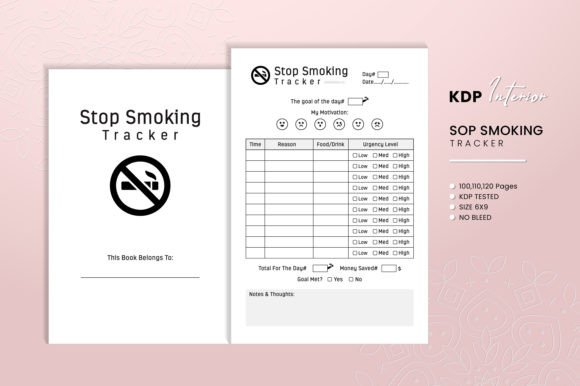
Stop Smoking Tracker – KDP Interior: A Practical Tool for Your Publishing Business
If you are building a low- or mid-content publishing business on Amazon KDP, you know how important it is to have interiors that are both functional and professional. The Stop Smoking Tracker – KDP Interior is one of those niches that can serve a motivated audience while saving you significant time. But too many sellers pick up a tracker interior without thinking through the details, and that can lead to returns, bad reviews, or wasted effort. In this article, I will walk you through what this product really offers, common mistakes people make when using or buying it, and how to avoid those pitfalls so your listing stands out and your customers get real value.
What Is the Stop Smoking Tracker – KDP Interior, and Why Does It Matter?
Simply put, this is a ready-to-upload PDF interior designed for a 6 x 9 inch trim size. It comes with 100, 110, or 120 pages, includes a “Belongs To” page, and provides a source file in EPS format so you can make edits if needed. The interiors are high resolution and tested for KDP, meaning you can upload them with confidence. For someone running a low-content business, having a pre-made tracker like this means you skip the design stage and go straight to publishing. But the real opportunity lies in how well you present and customize it for a specific audience—people who are trying to quit smoking.
Your buyers are adults between 20 and 50, often beginners in their quit journey or professionals looking for structured accountability. They want something simple, motivating, and easy to use. If you just upload the file as-is without considering their deeper needs, you miss the chance to build a loyal customer base.
Common Mistake #1: Treating This Tracker Like a Generic Notebook
It’s tempting to think any logbook or tracker will work for “Stop Smoking” because you can just slap a title on it. But a generic layout that doesn’t anticipate how people track their smoking habits will feel hollow. A good tracker should include prompts for triggers, cravings, slips, and milestones. The Stop Smoking Tracker – KDP Interior actually provides a framework for that, but I’ve seen sellers remove or ignore those elements when they try to repurpose the source file. That defeats the purpose.
Better approach: Use the EPS file to tailor the interior. Keep the core tracking columns but add a note or example page showing how someone might use the tracker. You can also include a simple instructions page. This small addition makes the product feel like a guided tool, not just blank lines.
Common Mistake #2: Ignoring the Trim Size and Bleed Settings
One of the most overlooked details is that this interior comes without bleed and at a 6 x 9 inch trim. If you try to upload it as-is into a KDP file that expects bleed, Amazon’s preview will show errors, and your book may be rejected or printed incorrectly. I’ve seen people assume “without bleed” means they can just set it to bleed anyway in KDP—that often results in cropping chaos.
Correct action: When you set up your KDP project, choose “No Bleed” for the interior. If you want to add color background or images that extend to the edge, you will need to modify the file and add bleed yourself. Stick with the intended spec unless you are experienced with layout adjustments. Also, remember that 6 x 9 is a standard trim size, but it affects the spine width and printing cost. For a tracker of 100–120 pages, the spine is thin, but you still need to assign the ISBN and cover correctly.
Common Mistake #3: Not Understanding the Three Page Count Options
This interior is offered in 100, 110, and 120 pages. I often see sellers pick one at random because they think “more pages equals more value.” But a stop smoking tracker doesn’t need to be thick—it needs to be usable. A 120-page book with only logging space could feel repetitive and heavy for someone who only tracks for a month or two. Meanwhile, 100 pages might be perfect for a 90-day program plus extras.
How to choose wisely: Picture the end user. Most people trying to quit need support for at least 90 days. With one page per day, 100 pages gives you room for a few intro pages, a “Belongs To” page, and an end page. 110 or 120 pages can include weekly summaries or a notes section. If you are publishing multiple versions, consider offering all three as separate products or series, each targeted at different timeframes. That way you catch both the short-term quitter and the long-term maintainer.
Common Mistake #4: Overlooking the Source File (EPS) When It Can Solve Real Problems
The EPS file is a vector format that allows you to edit the interior in programs like Adobe Illustrator or Inkscape. Many sellers never open it because they assume the PDF is all they need. But what if you want to change the language, add a logo, or tweak the heading font? With the EPS you can do that easily. Without it, you are stuck with the exact design as given. This is especially important if you plan to localize or brand your book for a specific audience (e.g., for a clinic or a personal coaching program).
Practical advice: Even if you don’t edit now, keep the EPS file as an asset. Test the PDF first, but know that you have flexibility. If a customer asks for a minor change, you can accommodate it and create a new variation. That builds trust and repeat sales.
Common Mistake #5: Skipping the KDP Test and the “Belongs To” Page
The product description says it is “KDP Tested,” but that doesn’t mean you should skip your own verification. I always recommend opening the PDF in Amazon’s Kindle Create or the KDP Previewer before you hit publish. Check that all pages display correctly, that the “Belongs To” page appears in the right spot, and that no text overlaps margins. The “Belongs To” page is a small detail that adds personalisation—it’s also a chance to include a welcome message or a short motivational quote. But some people remove it thinking it’s unnecessary, which reduces the feeling of ownership for the buyer.
Fix: Keep the “Belongs To” page. Use the EPS to customize the text slightly, like “This tracker belongs to:” with a line, and perhaps add a tiny space for date started. This turns a generic interior into something the user feels is theirs. Also run the KDP preview on both desktop and mobile to ensure the pages are clean.
Common Mistake #6: Not Aligning the Interior with the Cover or Marketing
You might have a beautiful cover that talks about “Quit Smoking Now,” but if the interior is exactly the same as every other tracker on Amazon, customers will feel misled. The interior’s design—layout, font choices, headings—should match the tone of your cover. If your cover is modern and minimal, the interior shouldn’t look busy with decorative elements. The Stop Smoking Tracker – KDP Interior offers a clean, high-resolution layout that works well with most styles, but you still need to ensure consistency. I’ve seen sellers pair a serious cover with a playful interior that uses script fonts—it feels disjointed.
Better practice: Before you publish, open the PDF and imagine it printed. Does the look remind you of the cover? If not, consider using the EPS to adjust the heading font or simplify the graphics. But be careful not to overdo it—the product is already designed to be high-quality. Small tweaks are fine; a full redesign may hurt the natural flow.
What to Check Before Making a Decision: Your Checklist
To avoid the mistakes above, run through these steps before you upload or buy a Stop Smoking Tracker – KDP Interior:
- Confirm the trim size (6 x 9 inches) and note that it comes without bleed. Set your KDP project accordingly.
- Decide on the page count based on your target audience’s expected usage. 100 pages for a 90-day program, 110 or 120 for longer or more detailed tracking.
- Open the EPS file at least once to understand its flexibility. You don’t have to edit it now, but know you can.
- Test the PDF using Amazon’s KDP Previewer. Check all pages, especially the “Belongs To” page and any repeated daily spread.
- Make sure the interior design complements your cover. If you’re not sure, ask a friend for a quick opinion.
- Consider adding a short usage guide or motivational page in the EPS, but keep it concise. Your buyers want a tool, not a lecture.
How These Mistakes Affect Your Results and Satisfaction
When you get these details right, your customers will actually use the tracker and feel progress. They are more likely to leave positive reviews and recommend it to others. On the other hand, if you ignore the bleed specs or use a mismatched page count, you might face returns or negative feedback about “missing pages” or “hard to use.” Worse, you could waste time fixing upload errors after you’ve already published. For a low-content business, your efficiency matters—every hour spent troubleshooting is an hour you could have spent launching another title.
By being careful with this interior, you also build a reputation. People searching for “Stop Smoking Tracker – KDP Interior” are likely typing that because they want a ready-made solution. If your product delivers on that promise and feels thoughtful, you’ll get organic sales and maybe even a few repeat buyers who follow your brand.
A Better Way to Use This Product for Your Business
Instead of treating this as just one more interior in your catalog, think of it as a starting point. Use the EPS source file to create variations: a version for men, another for women, or one with a specific colour palette. You could also pair it with a complementary journal or a weekly habit tracker. The key is to give the end user an experience, not just a PDF. For example, you could include a small “Congratulations” note at the end of 90 successfully tracked days. That kind of empathy turns a simple tracker into a powerful support system.
If you are a beginner, start with the PDF as-is. Get it live on KDP, test the market, then use the EPS to refine. If you are experienced, invest a little time in customization and watch your conversion improve. The product itself is solid—high-resolution, KDP-tested, and ready to upload. Your job is to present it in a way that feels indispensable.
Ultimately, the Stop Smoking Tracker – KDP Interior is a tool meant to save you time and help your customers quit a tough habit. When you avoid the common mistakes—like ignoring trim specs, selecting the wrong page count, or skipping the source file—you set yourself up for better sales, fewer headaches, and a more satisfying low-content business. Take the extra few minutes to test, tweak, and align it with your brand. That caring is what turns a good product into a great one.