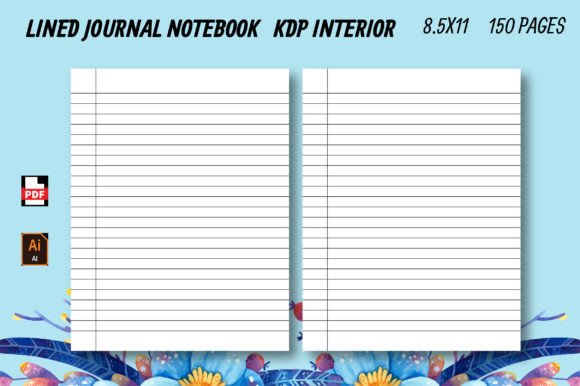
Lined Journal Notebook – KDP Interior
If you publish low-content or no-content books on Amazon KDP, you already know that quality interiors save time, reduce returns, and build trust with buyers. The Lined Journal Notebook – KDP Interior is a ready-to-use, fully editable template built for exactly that purpose. It gives you a polished, professional lined notebook interior without the need to design from scratch. Whether you are just starting your KDP journey or scaling a growing catalog, this interior offers a practical foundation that you can customize, brand, and publish quickly.
What Makes This Interior Different?
Many interiors available online come with limitations—fixed dimensions, low resolution, or hidden formatting issues that only appear after upload. The Lined Journal Notebook – KDP Interior addresses those pain points directly. It ships as a 100% vector, editable PDF that works with Adobe Illustrator, so you can resize, recolor, or adjust elements without losing sharpness. That vector flexibility means you are not locked into a single trim size. If you want to offer the same design in 6 x 9, 7.5 x 9.25, or any other standard size, you can scale the file cleanly.
The interior comes in an 8.5 x 11 inch format with 150 pages, no bleed, which simplifies the upload process for paperback or hardcover editions. It also includes a high-resolution JPG version at 300 DPI, useful for previews, mockups, or covers. Every file has been tested on Amazon KDP to confirm there are no errors, margin issues, or alignment problems before you upload.
Core Features That Support Efficient Publishing
Understanding what is inside the file helps you decide whether it fits your workflow. Here are the key qualities worth noting:
Full Editability in Vector Format
The vector PDF allows you to open the file in Adobe Illustrator and change nearly everything. Adjust line spacing, modify margins, swap colors, or add your own branding elements. If you want to include a header with a logo or a footer with a website URL, you can do that without starting over. This level of control is especially useful if you plan to create a series of journals with consistent formatting but different cover designs.
Print-Ready and KDP Tested
Nothing is more frustrating than uploading a file only to receive a KDP error about margins, resolution, or trim box. This interior has been run through Amazon’s upload system with no errors. The no-bleed configuration means you do not need to worry about content being cut off near the edges. For a lined journal, where users expect clean, straight lines from top to bottom, this precision matters.
High-Resolution Output for Multiple Uses
The included 300 DPI JPG is useful beyond the PDF itself. You can use it for social media mockups, listing images, or previews on your author page. If you sell your journals through other platforms like Etsy or your own website, that high-res image saves you from creating separate visual assets.
Practical Applications Across Different Audiences
A lined journal interior might seem straightforward, but its versatility makes it valuable for many use cases. Here is how different groups can put it to work.
For KDP Publishers and Self-Publishers
If you are building a low-content book business, consistency across your catalog builds brand recognition. Using the Lined Journal Notebook – KDP Interior as your standard template means every journal you release has the same line weight, spacing, and margin balance. That uniformity helps customers know what to expect when they buy from you. You can also create variations—softcover, hardcover, large print, or compact editions—by resizing the vector file rather than redesigning each one.
For example, a publisher launching a line of gratitude journals could use this interior with a custom header that says "My Gratitude Journal" and a subtle footer with their brand name. The same base file can then be adapted for a fitness tracker, a daily planner, or a meeting notebook by swapping the cover and adjusting a few design elements.
For Freelancers and Creatives
Freelance designers and content creators often need to produce custom journals for clients, workshops, or digital products. The vector editability means you can personalize each project without rebuilding the layout. If a client wants a journal with wider lines for accessibility or a specific color scheme that matches their brand palette, you can make those changes in minutes.
Creative professionals also appreciate the ability to export the interior in different formats. You can produce a PDF for print-on-demand, a JPG for digital previews, and even an editable version that clients can review before final approval.
For Educators and Trainers
Teachers, tutors, and workshop facilitators often use lined journals as course materials or note-taking supplements. With this interior, you can create branded notebooks for your students or training participants. Add your course title, a relevant quote on each page, or prompts that guide note-taking during sessions. Because the file is fully editable, you can adjust the line spacing to suit different age groups or writing abilities.
For Entrepreneurs and Business Owners
Businesses use custom journals for client gifts, team onboarding kits, or branded merchandise. A lined journal with a professional interior reinforces your brand’s attention to detail. You can include your company’s mission statement on the first page, use brand colors for the lines, and add a call-to-action or website link in the footer. Since the interior is print-ready, you can order small batches through KDP or another print-on-demand service without minimum quantities.
Usability and Efficiency in Real Workflows
Efficiency matters when you are publishing multiple titles or managing several projects. The Lined Journal Notebook – KDP Interior saves you time at several points in the workflow.
Pre-production: You skip the layout phase. The lines are already aligned, the margins are set, and the page count is fixed at 150. That means you can move directly to cover design and listing creation.
Customization: Even with significant edits, the vector format reduces file manipulation time. Need to change the line color from gray to light blue? That is a single selection in Illustrator. Want to reduce line spacing for a compact journal? Adjust one setting and the entire document updates.
Upload and approval: Because the file has been tested on KDP with zero errors, you avoid the approval delays that happen when interiors fail automated checks. That is a small detail but a meaningful one when you are trying to launch on a specific date.
Considerations Before You Publish
Even with a well-built interior, a few practical checks will help you get the best result.
- Cover alignment: The interior uses no bleed and is sized at 8.5 x 11 inches. Make sure your cover template matches these dimensions exactly. A mismatch in trim size can cause alignment issues in the final printed book.
- Font embedding: If you add text elements like headers, page numbers, or prompts, ensure any fonts you use are embedded in the PDF. Amazon’s system requires embedded fonts to render correctly across devices and print runs.
- Preview on multiple devices: Before publishing, download the Kindle Previewer tool and check how the interior looks on different screen sizes. Although this is primarily a print product, many customers also purchase the Kindle version for digital note-taking.
- Test one copy first: Order a single proof copy before committing to a full launch. Even tested interiors benefit from a physical check. You may notice that the paper weight or opacity affects how the lines appear, especially if you use a cream paper option.
How This Interior Supports Your Brand and Audience
A journal is often a personal purchase. Customers buy them for goal setting, creative writing, daily organization, or reflection. The interior design should support that experience without drawing attention to itself. The Lined Journal Notebook – KDP Interior accomplishes this by keeping the layout clean and consistent. There are no distracting graphics, overly bold lines, or cramped margins. The writing area feels open and usable.
From a branding perspective, consistency across your product line builds credibility. If a customer buys one of your journals and enjoys the writing experience, they are more likely to buy another from the same publisher. Using a reliable interior template ensures that every title in your catalog delivers that same experience.
For businesses using journals as giveaways or corporate gifts, the professional appearance of the interior reflects on your brand. A poorly spaced or misaligned journal can undercut the message you are trying to send. A clean, well-proportioned interior suggests quality and care.
Final Thoughts on Choosing a KDP Interior Template
The Lined Journal Notebook – KDP Interior is a practical tool for anyone publishing lined journals, whether you are a beginner testing your first title or an experienced publisher streamlining your workflow. Its vector editability, tested compatibility, and print-ready format remove common obstacles that slow down production. By starting with a solid interior, you can focus your energy on cover design, marketing, and building your audience.
If you value efficiency, consistency, and professional results without unnecessary complexity, this interior deserves a spot in your toolkit. Customize it to match your brand, adapt it for different formats, and publish with confidence knowing the file has already passed Amazon’s checks. That is the kind of foundation that lets you scale your publishing efforts without sacrificing quality.